![MAIA_LAND_RGB.png]](https://support.maiagrazing.com/hs-fs/hubfs/Logos/MAIA_LAND_RGB.png?height=40&name=MAIA_LAND_RGB.png)
To register a death you can do it from the:
How to record a death from the livestock dropdown
-
Click on the 'Operations' tab.
-
Click on 'Livestock'
-
Click on 'Register Deaths'

-
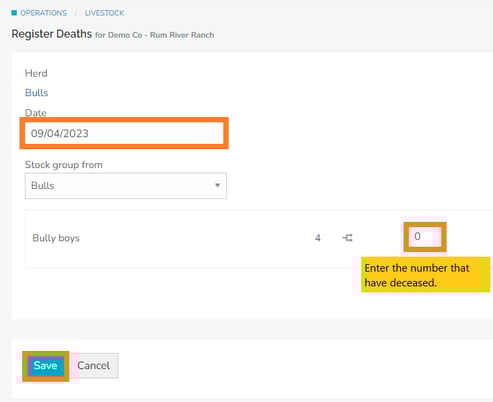
Click on the drop down box under 'Mob/Herd' (1.)
-
Click on the name of the mob/herd that the death is related to.
-
Click into the box underneath 'Date' (2.)
-
Enter the date of the death

- Click on the drop down box under 'Stock group from' (3.)
- Click on the name of the stock group that the deceased animals relate to.
- Click into the data entry box and enter the number of head that are deceased. (4)
- Click on 'Save' when finished.

How to record a death from the herd management screen
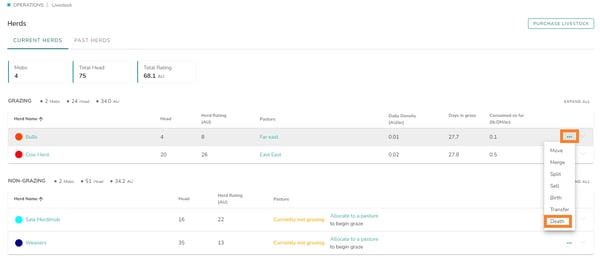
- Click 'Operations' tab
- Click 'Livestock'
- Click ''
 (3 dots)' far right of the screen of the mob/herd you wish to record a death.
 - Select 'Death'
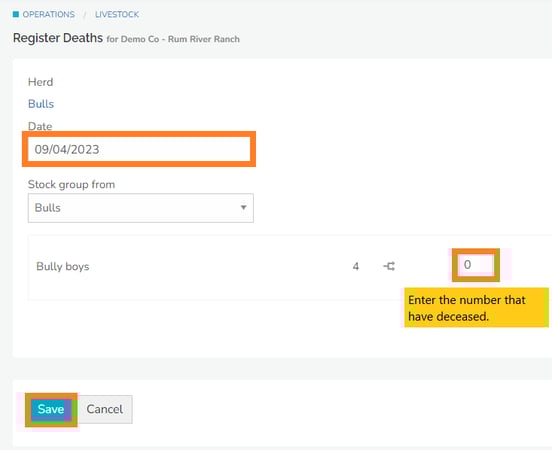
- Click into the box underneath 'Date' Enter the date of the death.
- Click into the data entry box and enter the number of head that are deceased.
- Click on 'Save' when finished.
How to record a death from the Map
- Click 'Map' tab
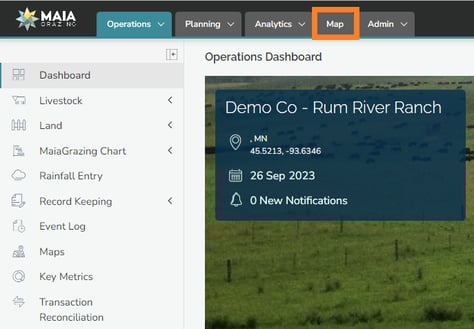
- Click on the mob/herd icon you would like to register a death for
- A pop-up will appear in the lower right corner of your screen.
- Click ' (3 dots)'
- Click 'Death'
- Click into the box underneath 'Date' Enter the date of the death.
- Click into the data entry box and enter the number of head that are deceased.
- Click on 'Save' when finished.