![MAIA_LAND_RGB.png]](https://support.maiagrazing.com/hs-fs/hubfs/Logos/MAIA_LAND_RGB.png?height=40&name=MAIA_LAND_RGB.png)
Step 1: Create a stock feed product in product inventory
Step 2: Recording fodder or supplement stock feeding events
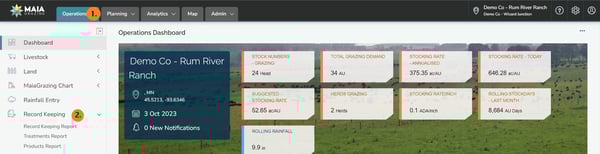
Step 1: Navigate to the record keeping page
-
Click on 'Operations' (1)
-
Click on 'Record Keeping' (2)
Step 2: Generate Stock Feed report
-
Click on the drop down box under 'Type'
-
Click on 'Mob/Herd'
-
Click on the drop down box under 'Category'
-
Click on 'Stock Feed'.
-
Click on the drop down box under 'Report Interval'
-
Choose the required date (for custom dates choose Any Dates)
-
Tick 'Show Additional Attributes' to show extra details (Product Name, Batch Number, Application Rate, WHP, ESI, Date Safe for Slaughter, Total Qty)

Step 3: Download your report
-
Hover your mouse over the 3 dots
 in the top right hand side of the page.
 -
Click on 'Download Report'.
