![MAIA_LAND_RGB.png]](https://support.maiagrazing.com/hs-fs/hubfs/Logos/MAIA_LAND_RGB.png?height=40&name=MAIA_LAND_RGB.png)
Setup a yard, sorting pen, or corral to hold your animals while they are not grazing or are being (supplementary) handfed. This article explains how to:
Having a yard, sorting pen, or corral setup in the MaiaGrazing program will give you somewhere to allocate your animals while they are not grazing for short periods. In MaiaGrazing all of the above are referred to as 'Yards'.
Step 1: Access the Paddock/Pasture Setup screen
-
Click on the cog wheel
 in the top right hand corner of the screen to open the 'Settings Dashboard.' (1)
 -
Locate the 'Land' box (2)
-
Click on 'Paddock/Pasture Setup' (3)

This will open your paddock/pasture set up screen.
Step 3 Adding a yard
-
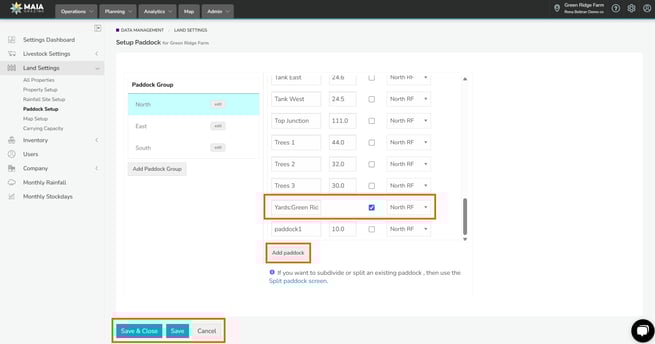
Click on the paddock/pasture group that you want to add a yard to. (1) (It will be highlighted in blue if it is selected.)
-
Click on the “Add Paddock/Pasture” button underneath the paddock/pasture list. (2)

-
Click into the newly created data entry box.
-
Type the name of the yard/pen/corral.
-
Click on the tick box in the 'YARD' column.
-
Click on 'Save' when you are finished.
To Delete a Yard
You can delete individual paddocks/pastures here by:
-
Hover your mouse over the yard you want to delete.
-
A blue cross will appear to the right.
-
Click on the blue cross to the right of the name of the yard.
If there is not a blue cross beside the yard that you wish to delete then that yard has previously been, or currently is being, used.

To Change the Name of a Yard
To change the names of your paddocks/pastures you can typing over the existing name.