![MAIA_LAND_RGB.png]](https://support.maiagrazing.com/hs-fs/hubfs/Logos/MAIA_LAND_RGB.png?height=40&name=MAIA_LAND_RGB.png)
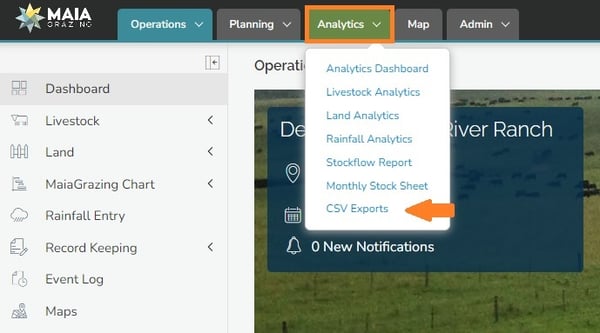
Step 1:
-
Click on 'Analytics' Tab
-
Click on 'CSV Exports'
Step 2: Download required documents
-
Select the data that you wish to export by Clicking the blue writing

Step 3:
A CSV file will be downloaded to your computer.

Note: To export grazing plans, click on the Planning tab > Grazing Plans. Open the grazing plan you want to export. Then click the 3 dots in the top right corner and then Grazing Plan Download.