![MAIA_LAND_RGB.png]](https://support.maiagrazing.com/hs-fs/hubfs/Logos/MAIA_LAND_RGB.png?height=40&name=MAIA_LAND_RGB.png)
This article explains how to update the numbers, weights and ratings for multiple mobs at the one time from the mob or herd list.
Sometimes you want to change information across more than one mob or herd at a particular date. For example, it is lambing time and you need to increase the DSE rating for your ewes, but have multiple lambing mobs.
-
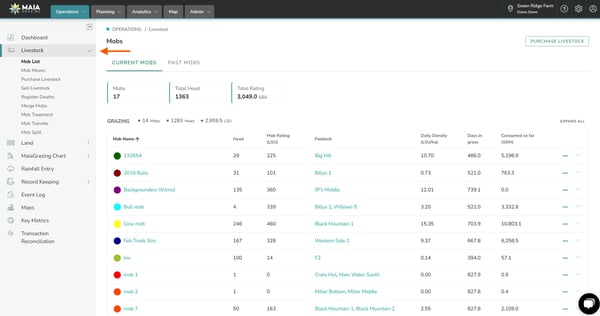
Click on the 'Operations tab'. (1.)
-
Click on 'Livestock' to open the mob list. (2.)
-
Scroll down to the bottom of the Mob/Herd List
-
Click on 'Edit' in the bottom left corner. (3.)
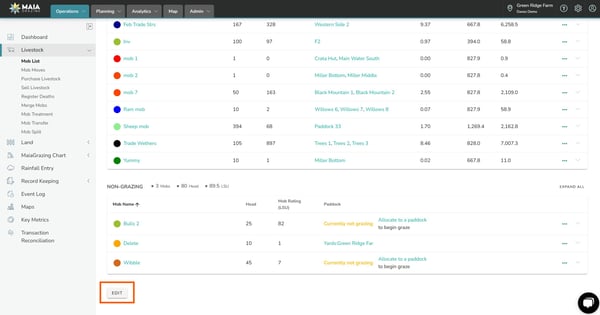


This opens editable fields for all stock groups of all mobs/herds.
-
Scroll to the top of the mob/herd list.
-
Click into the date entry box.
-
Enter the date from which you want to make edits - you can do this from today, a past date or a future date (for example, you know that mobs will start calving on a certain date, so you can update the stock rating for cows from that date - this ensures accurate grazing plans as they then take into account the future stock rating change).
-
Update stock feed demand ratings (a) The ? icon opens a ratings lookup table.
-
Update weights as required (b)
-
Update price ($/kg or $/lb) as required (c)
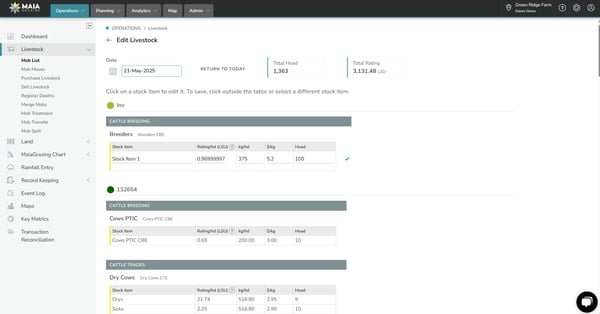

Hint: After you have finished updating each item, click outside the box so that the "tick" shows you have saved your changes.
-
Adjust all mobs/herds as required.
-
To check your changes, click on "View History" behind the three dots to the right of each stock item to view the sequence of changes for that particular instance or class of animals within a mob
-
If you need some help with determining ratings (or feed demand) for the animals in the herd, please use the Rating Lookup Table or this Online Ratings Calculator
-
Please note, the changes will flow as an absolute figure from the date selected for the change until "today". For example, if the Breeders had a lactating LSU (2.21) entered for 1st January, 2021, this change would then flow all the way until today, unless a subsequent change/s is made on a date in between (eg 1st March 2021).
To make adjustments for multiple dates, simply go through the process again for a new date.