![MAIA_LAND_RGB.png]](https://support.maiagrazing.com/hs-fs/hubfs/Logos/MAIA_LAND_RGB.png?height=40&name=MAIA_LAND_RGB.png)
The open gates function lets Maia know that stock have access to more than one paddock/pasture over the defined period. It assumes equal grazing across the whole area.
If the mob/herd is already in one of the paddocks/pastures in Maia and you then want to display that the mob/herd has had access to a second (or more) paddock/pasture during that time then you have to edit the mob/herd move.
This article explains the process for initiating Open Gates from an existing graze in the MaiaGrazing chart.
Access the grazing chart
-
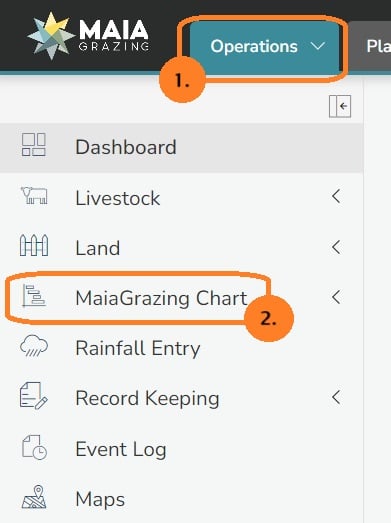
Click on 'Operations' (1)
-
Click on 'Grazing Chart' in the left hand menu (2)

Access the move to be edited
Click on the highlighted box relating to the mob/herd in the Grazing Chart.
Sometimes the graze can be slow to load, so select the graze and give it a moment to pop up. This is common in rural areas with low bandwidth.
Editing the move to include open gates
-
Wait for the move pop up screen to open
-
Check that the exit date is still appropriate for when the graze will end (4)
-
Click on the drop down box '+add another paddock/pasture'. (5)
-
Select the paddock/pasture that you want to open gates with.
-
Repeat this step until all of the paddocks/pastures accessed during this graze are listed.
With multiple paddocks selected in Move Details screen the link to the open gates feature becomes available.

-
Click on the blue writing 'Open gates'
This will open up a fourth tab at the top of the move screen called 'Gates'

Setting the dates for the open gate graze.
-
Click on the 'Gates' tab.
-
Note the Entry Date/Time(A) and the Exit Date/Time(B) at the top of the tab.
These dates and times are drawn from the information entered in the move details tab.
These dates will apply to ALL paddocks/pastures in this screen UNLESS either an open gate date and/or a close gate date is entered.
To change the entry date/time and exit date/time at the top of the 'GATES' screen you will need to click back onto the Move Details tab.
If either the open gate date or closed gate date are left blank for any paddock in this screen the program will reference the move dates.
-
Enter the date/time that the mob/herd first had access to each paddock in the 'Open Gate Date' column.
-
Enter the date/time that the mob/herd stopped having access to each paddock in the 'Close Gate Date' column.
-
Click on the 'Confirm Move' button when complete
Example

Paddock/pasture 1 will be grazed from 04/04/2021 8:00 to 09/04/2021 8:00. Because these boxes are empty the program will use entry and exits dates entered into the 'Move Details' screen.
Paddock/pasture 2 and Paddock/pasture 1 will be grazed from 06/04/2021 8:00 to 08/04/2021 8:00
What this will look like in the grazing chart:
