![MAIA_LAND_RGB.png]](https://support.maiagrazing.com/hs-fs/hubfs/Logos/MAIA_LAND_RGB.png?height=40&name=MAIA_LAND_RGB.png)
This article explains how to change the grazing availability of individual paddocks to account for times when their area is not to be used for grazing.
If a paddock/pasture is being used for a purpose other than grazing and you do not want the area of this paddock/pasture used in your grazing calculations you can make the paddock/pasture inactive in the program.
You can do this by:
Step 1: Access the paddock/pasture list:
- Click on 'Operations'
- Click on 'Land'
- Click on 'Paddock/Pasture List'.
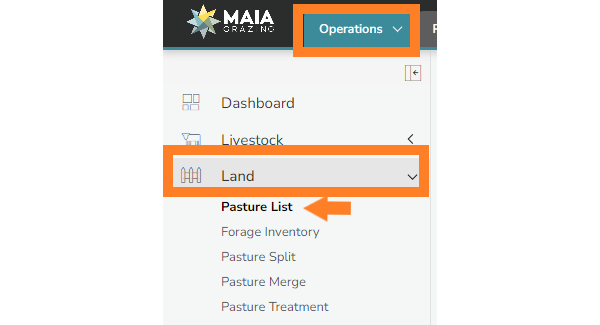
Step 2: Access the paddock/pasture management screen for the paddock/pasture to be made inactive.
-
Click on the name of the paddock/pasture that you wish to make inactive.

This will open your Paddock/Pasture Management screen.
Step 3: Open the grazing availability pop up
-
Click on the the word 'Active' in blue writing.

This will open a pop up box that will let you enter the date that you wish the paddock/pasture to be inactive from in the system.
TIP: Make sure to TICK the "Show on Grazing Chart While inactive" box, so you can easily visualise which paddocks are inactive, and the dates they became inactive.
Then Click "Proceed".

Step 4: Set the date that the paddock/pasture is to be inactive from
-
Enter the date that you want the paddock/pasture to become inactive
-
Click on 'Proceed'
Once you click on proceed the paddock/pasture will be inactive until you come back into this screen and make the paddock/pasture active again.
Step 5: Making a paddock/pasture inactive for a set period of time
If you would like to set a date for the paddock/pasture to be unavailable for grazing and a date for it to be made available again you can:
-
Click on the word 'More Information' in blue writing.

This will open the Grazing Availability pop up box which will allow you to enter a start and end date for the period that you would like the paddock/pasture to be unavailable for grazing.

-
Enter the date the paddock/pasture is to be unavailable from
-
Enter the date the paddock/pasture is to be made available again
Step 6: Save the paddock grazing availability.
-
Click on 'Save Changes'
Once you click on save changes this paddock/pasture will automatically become inactive for the period between the From date and the To date unless you come in and reactivate the paddock/pasture manually.