![MAIA_LAND_RGB.png]](https://support.maiagrazing.com/hs-fs/hubfs/Logos/MAIA_LAND_RGB.png?height=40&name=MAIA_LAND_RGB.png)
Note: This feature is for permanent changes to your paddocks and pastures and is not suitable to account for temporary, strip, or techno grazing.
Before you begin
Paddock Names: Before starting the paddock/pasture split process, decide on the new paddock names. You may wish to continue using the existing paddock/pasture name for one of the new paddocks/pastures (eg. current paddock/pasture to be split is called Hill, and the two new paddocks will be called Hill and Gully).
It is not possible to have 2 paddocks/pastures with the same name, so FIRST rename the original paddock to Hill OLD. This is done by changing the name in Operations > Paddock List.
Date implications: It is important to enter the paddock split as close as possible to the physical split event. When a paddock/pasture is split is 'superseded' by the new paddocks, and any transactions that occurred after the split date are lost.
Eg. Hill paddock was split to into 2 new paddocks: Hill and Gully on 01 May
Hill paddock was grazed on 20 May.
Gully paddock was grazed on 25 May.
Paddock split was entered into the
Stock then stock grazed So If the paddock/pasture split occurred on 1 May and the stock have subsequently grazed affected paddocks the graze history may not be correct and entering a paddock/pasture split on a past date may cause this grazing history to be lost.
Same Day Transactions: A paddock cannot be both active and inactive in Maia on a single date. If there a multiple actions (splits or merges) for a paddock put them on separate dates. eg 1st Jan and 2nd of Jan.
Graze Plan implications: If the paddock/pasture to be split is included in a current or future Graze Plan then the graze plan may need to be updated.
Livestock: Make sure there are NO livestock in the paddock/pasture in Maia on the date of the split. If you do have livestock in the paddock/pasture move them into a yard in Maia. After you complete the paddock/pasture split, move the livestock into paddock/pasture they are grazing. If the fencing event occurred mid graze, you may have to use the open gates feature to effectively document the graze.
Grazing Data: The grazing data is attached to the original (pre-split) paddock/pasture. The newly created paddocks/pastures won't have graze history upon the split being created.
Step 1: Access the Paddock/Pasture Split screen.
-
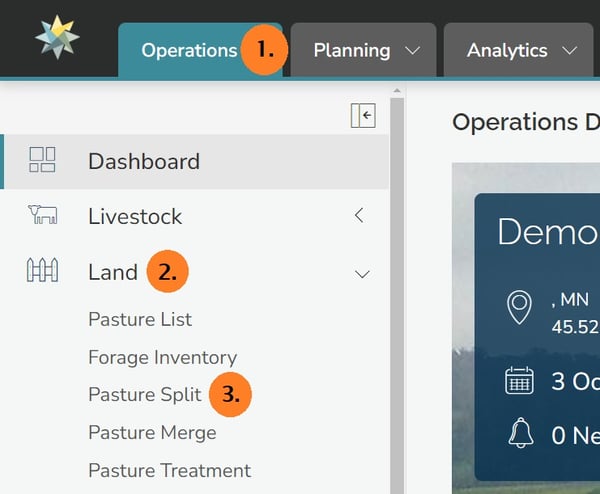
Click on 'Operations' (1)
-
Click on 'Land' from the left hand menu (2)
-
Click on 'Paddock/Pasture Split' (3)
Step 2: Choose the paddock/pasture to be split
-
Click on the date box
-
Enter the date of the split from the calendar or type the date in.
-
Click on the drop-down box under 'Paddock/Pasture To Split'.
-
Click on the name of the paddock/pasture to be split

Step 3: Enter the details of the newly created paddocks/pastures
Two new paddocks will automatically be created. These paddocks will be assigned the named of the original paddock/pasture with a number as a default.
-
Click into the text box under 'Split into Paddocks/Pastures' (a)
-
Type over the default names with the names of the new paddocks/pastures
-
Click into the data entry box under 'Area' (b)
-
Enter the area of the new paddock/pasture if you know it. (If you don't know the area of the new paddocks leave this number as it is. The real area can be calculated and adjusted later after drawing in the boundaries of the new paddocks/pastures.)
-
Click on the drop down box under 'Paddock Group' (c)
-
Click on the name of the paddock group that the new paddock will belong to.
-
Click on save when finished.

Splitting or merging your paddocks will cause the existing boundaries to be cleared from the map! These boundaries will need to be redrawn to reflect your recent changes.