![MAIA_LAND_RGB.png]](https://support.maiagrazing.com/hs-fs/hubfs/Logos/MAIA_LAND_RGB.png?height=40&name=MAIA_LAND_RGB.png)
Some of the key metrics in MaiaGrazing rely on 365 days of grazing data. For example, your stocking rate per 100mm, rolling stockdays and annualized stocking rate. In order to be able to see how your stocking rate compares to your carrying capacity, or set a useful forecast, you need 12 months of monthly stock days.
What are monthly stockdays?
Monthly stockdays are a way to determine the graze demand on an entire property or paddock/pasture group for a month. This is calculated by:
The number of head x stock unit rating x number of days in the month.
The stock unit rating is an estimate of the average amount of feed consumed feed for each class of animal on a daily basis.
An example of what a typical livestock inventory might look like this for one month:
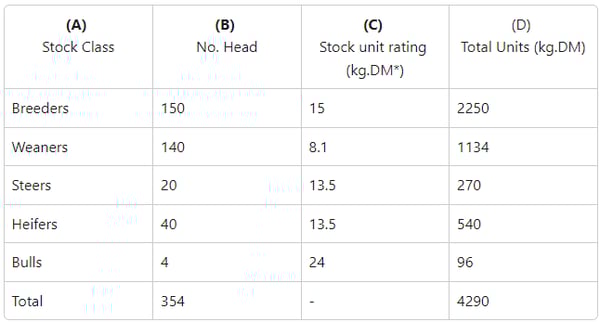
Note: The kg.DM for each stock class in this example has been calculated assuming stock are consuming 3% of their body weight.
Breeders average 500 kg therefore 500 x 0.03 = 15 kg.DM. We have used kg.DM as the stock unit rating in this example, but you can use DSE, LSU, SAU or AU - the process is the same.
Another option for calculating your stock unit rating is to use Handy Ratings Calculator for LSU or DSE
Calculating monthly stockdays manually
-
Create a table like the one above for your property.
-
List your different classes of animals in column A
-
Enter the number of head for each class in column B
-
Enter the stock rating unit in column C
-
Multiply the number in column B by the number in column C
-
Write the total units in column D
-
Repeat for each row (stock class)
-
Add all of the total units in column D together
This number is your total grazing demand per day
For the example above, the total daily grazing demand is 4290 kg of dry matter.
In other words, livestock consume/graze 4290 kg of dry feed each day across the property.
To calculate your monthly grazing demand (monthly stockdays) multiply your total daily feed demand (4290) by the number of days in the month (30 days).
4290 x 30 = 128700
This number is your total monthly stockdays.
Calculating monthly stockdays in a spreadsheet
A spreadsheet like this will help you to collate your stock numbers and ratings by stock class for each month.
If you would like a copy of this spreadsheet, please contact the support team.
In the yellow rows you enter number of head by stock class for each month
In the white rows you enter the stock unit rating, which will change as the weight and reproductive status of the animal changes through the year.
The bottom row shows the total monthly stockdays for the property.

Entering monthly stockdays into MaiaGrazing
Once you have calculated your monthly stock data you can enter your monthly stockdays into MaiaGrazing.
What if you have multiple cells or paddock/pasture groups?
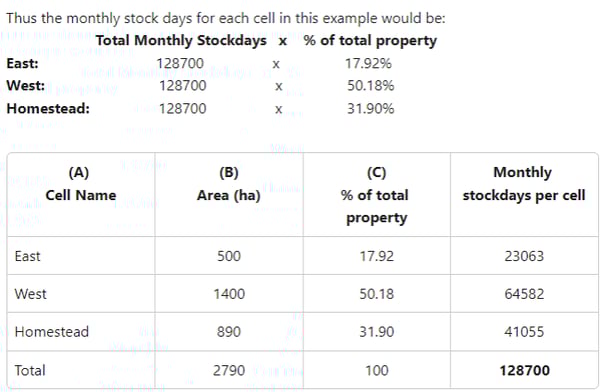
When you have multiple cells or paddock/pasture groups in MaiaGrazing, the program requires you to enter the monthly stockdays per cell/paddock group. To do this simply, proportion the monthly stock days based on the area that the paddock group makes up of entire property.
An example of how to proportion monthly stockdays.
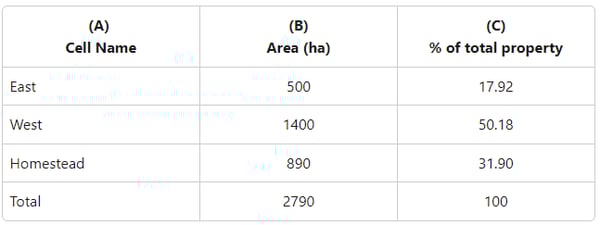
This property has 3 cells/paddock groups:
-
Create a table like the one above for your property.
-
List your cells/paddock groups in column A
-
Enter the area for each cell/paddock group in column B
-
Add the area of all the paddock groups together to find the total area of your property/ranch.
-
Divide the area of each cell/paddock group by the total area of your property/ranch.
-
Write the percentage amount for each cell/paddock group in column C
-
Multiply the total monthly stockdays by the percentage of land area for each cell/paddock group.