![MAIA_LAND_RGB.png]](https://support.maiagrazing.com/hs-fs/hubfs/Logos/MAIA_LAND_RGB.png?height=40&name=MAIA_LAND_RGB.png)
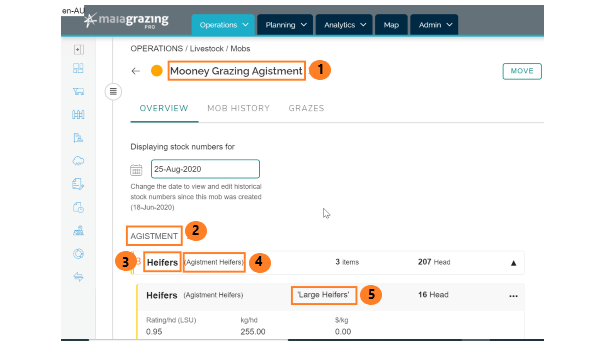
This article explains the following stock labels seen in the MaiaGrazing Mob Management screen:
-
Mob/Herd Name (1)
-
Enterprise (2)
-
Stock Class (3)
-
Stock Group (4)
-
Stock Item (5)
Mob/Herd Name (1)
Herds/mobs are a group of animals that graze together in the same paddock/pasture at the same time. A herd/mob can contain animals from different species, classes, and enterprises. It can be changed at any time by clicking on the name and editing, then pressing save.
Enterprise (2)
An enterprise is a section of your business. For example you may run a breeding enterprise, a trading enterprise and an agistment / custom feeding enterprise. Your stock flow report (Analytics Tab > Stock Flow Report) can be filtered to show your enterprise numbers at any time.
Stock Class (3)
The different types of animals you have. For example Bull, Cow, Calf, Mixed Weaners or Ram, Ewe, Lamb. Your stock flow report (Analytics Tab > Stock Flow Report) can be filtered to show your stock class numbers at any time.
Stock Group (4)
Is where your stock classes are matched up to your enterprises so that when you setup your mobs/herds the correct number of animals can be matched up to the correct enterprise. To move stock between stock groups you need to transfer the stock (for example - a calf to a weaner heifer).
(Click here for more information about transfers)
Label (5)
Label of the Stock Item within the Stock Group - this is essentially a tag that you can give a stock group. This information does not flow through to your stock flow report. It is simply there for you to add extra detail to a stock group in a mob.
Accessing the mob management screen
-
Click on 'Operations' tab
-
Click on 'Livestock'
-
Click on 'Mob/Herd List'
-
Click on the name of the mob/herd from the mob/herd list.