![MAIA_LAND_RGB.png]](https://support.maiagrazing.com/hs-fs/hubfs/Logos/MAIA_LAND_RGB.png?height=40&name=MAIA_LAND_RGB.png)
Step 1: Create a new stock class.
Step 2: Create a new enterprise for stock feed production.
Step 3: Create a new stock group.
Step 4: Purchase in a harvesting mob/herd
Step 5: Use the harvesting mob/herd to 'graze' the harvested amount from the paddock/pasture.
Step 6: Sell out the harvesting mob/herd.
Step 1: Create a new stock class.
- Follow the steps here to create a new stock class.
- Call this stock class something relevant to your harvesting activity

Step 2: Create a new enterprise for stock feed production.
If you are going to sell this harvested fodder you may wish to create a new enterprise to keep this event separate from your livestock. Otherwise you can assign it to an existing enterprise.
-
Follow the steps here to create a new enterprise.
-
Call this enterprise something relevant to your harvesting activity

Step 3: Create a new stock group.
-
Follow the steps here to create a new stock group.
-
Call this stock group something relevant to your harvesting activity

Step 4: Purchase in a harvesting mob/herd
-
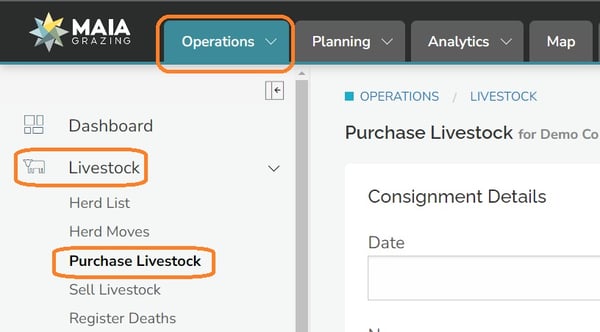
Click on the 'Operations' tab.
-
Click on 'Livestock' from the left hand menu
-
Click on 'Purchase Livestock'
-
Click on the date box. (1)
-
Enter the date of the harvesting event.
-
Click on the name box. (2)
-
Enter a recognisable name for this harvesting mob/herd.
-
Ignore 'invoice number'. (3)
-
Click on the box under 'location'. (4)
-
Enter anything in this box that you wish.
-
Ignore 'Seller's Business Ref'. (5)
-
Click on the drop-down list under paddock/pasture.
-
Click on the name of the paddock/pasture to be harvested (6)

-
Click on the drop down to select the harvesting stock group. (7)
-
Click into the data entry box (a)
-
Type over Stock Item 1 with a name for the harvest
-
Click in the data entry box under 'HEAD'
-
Enter the number 1
-
Click in the data entry box under 'WEIGHT PER HEAD'
-
Enter the number 0
-
Click in the data entry box under 'RATING'
-
Enter the total Yield in kg or lb to be harvested either in total or per day if preferred.
-
Leave the price boxes set to 0.

Step 5: Use the harvesting mob/herd to 'graze' the harvested amount from the paddock/pasture.
-
Allow the mob/herd to graze for the required amount of time to harvest the total amount.
Step 6: Sell out the harvesting mob/herd.
-
Follow the steps here to create a sale event.
-
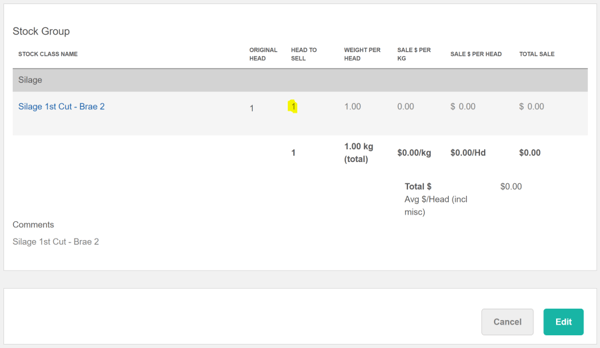
Enter a comment so that you can easily search for this event in the future.
-
Check the graze chart and the graze yield will be Total Kg / Area = kg/ha, or in our example be 15,000kg divided by 5ha = 3,000 kg/ha silage
Recording the feeding out of Harvested fodder.
To record the feeding out of the harvested fodder to your mobs or herd follow the instructions in the recording fodder or supplement feeding guide (Step 2 of stock feeding guide).
When the silage is subsequently fed out, the Rating of the animals consuming it needs to be reduced to appropriately deal with the fact the silage has already been accounted for from that property. For example a 1.5 DSE Ewe, receiving 1kg/day of Dry Matter in silage would have her daily Rating reduced from 1.5 to 0.5 DSE.
Q: What happens if the silage is fed out in different paddocks to the one it was harvested from?
A: The yield is already accounted for, so it is being treated like any other form of supplementary feed.